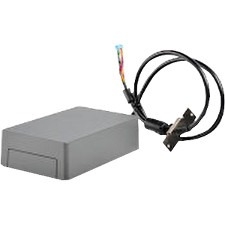
Image may not reflect the actual item.
Price: $223.69
+ Free Shipping
Quantity:

In Stock/Mfg Direct Ship
Last Updated: Feb 11, 2026
No Sales Tax except these states
 , PO and Wire.
Place the internal hard disk from the MFP or printer into the enclosure; and then attach the enclosure with the hard disk to the MFP or printer using the USB cable. The hard disk may now be easily removed from the MFP or printer for secure storage overnight.
Main Specification
| General Information | |
| Manufacturer | Xerox Corporation |
| Manufacturer Part Number | 57X0070 |
| Manufacturer Website Address | http://www.xerox.com |
| Brand Name | Lexmark |
| Product Name | Removable Hard Disk Enclosure Kit |
| Product Type | Drive Enclosure |
| Physical Characteristics | |
| Form Factor | External |
| Height | 1.9" |
| Width | 4" |
| Depth | 6.9" |
| Weight (Approximate) | 1.07 lb |
| Miscellaneous | |
| Package Contents |
|
| Compatibility | Lexmark Printer:
|
| Certifications & Standards |
|
| Country of Origin | United States |

Similar Products:

 WARNING:: The plastic used in cable products can expose you to lead and lead components,
chemicals known to the State of California to cause cancer, birth defects, or other reproductive harm.
For more information go to www.P65Warnings.ca.gov
WARNING:: The plastic used in cable products can expose you to lead and lead components,
chemicals known to the State of California to cause cancer, birth defects, or other reproductive harm.
For more information go to www.P65Warnings.ca.gov
