STARTECH
CPUFANADAPT StarTech.com Fan Adapter - TX3 to 2X LP4 Power Y splitter Cable - 4 pin internal power (M) - 4 pin internal power, 3 pin internal power - 12in
Mfg Part Number: CPUFANADAPT , Item #: 546085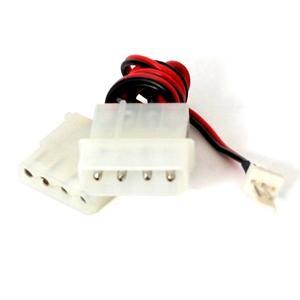
Image may not reflect the actual item.
Price: $22.45
Quantity:

In Stock: 8
Last Updated: Sep 01, 2026
No Sales Tax except these states
 , PO and Wire.
This 12in 3-pin (TX3) to LP4 Power Y-cable lets you connect your CPU fan directly to the computer power supply, instead of connecting it to the designated motherboard port. The adapter cable features a TX3 connector for connecting to the CPU fan, as well as a female LP4 connection to the computer power supply and an extra LP4 male connector that compensates for the used of the LP4 connector used to connect to the power supply. This high quality adapter is backed by StarTech.com's Lifetime Warranty. More from the Manufacturer

Main Specification
| General Information | |
| Manufacturer | StarTech.com |
| Manufacturer Part Number | CPUFANADAPT |
| Manufacturer Website Address | http://www.startech.com |
| Brand Name | StarTech.com |
| Product Name | 12in Fan Adapter TX3 to 2x LP4 Power |
| Packaged Quantity | 1 Each |
| Product Type | Internal Power Cord |
| Technical Information | |
| First End Connector Type | LP4 |
| First End Connector Detail | 1 x 4-pin LP4 Male |
| Second End Connector Type | TX3 |
| Second End Connector Type | LP4 |
| Second End Connector Detail | 1 x 4-pin LP4 Female |
| Second End Connector Detail | 1 x 3-pin TX3 Male |
| Device Supported | Power Supply |
| Physical Characteristics | |
| Cord Length | 12" |
| Weight (Approximate) | 0.02 lb |
| Miscellaneous | |
| Compatibility | CPU Fan Adapter |
| Country of Origin | China |
| Environmentally Friendly | Yes |
| Environmental Compliance | Waste Electrical and Electronic Equipment Directive (WEEE) |
| Environmental Compliance | Registration, Evaluation, Authorization and Restriction of Chemicals (REACH) |
| Environmental Compliance | Restriction of Hazardous Substances (RoHS) |
| Warranty | |
| Limited Warranty | Lifetime |
- Allows a fan with a TX3 motherboard connector (2 pins connected) to draw power from a standard LP4 power supply connector
| Warranty | Lifetime |
| Connector A | 1 - LP4 Male |
| Connector B | 1 - LP4 Female |
| Connector B | 1 - TX3 Male |
| Product Length | 6 in [152.4 mm] |
| Carton Quantity | 240 |
 WARNING:: The plastic used in cable products can expose you to lead and lead components,
chemicals known to the State of California to cause cancer, birth defects, or other reproductive harm.
For more information go to www.P65Warnings.ca.gov
WARNING:: The plastic used in cable products can expose you to lead and lead components,
chemicals known to the State of California to cause cancer, birth defects, or other reproductive harm.
For more information go to www.P65Warnings.ca.gov
