STARTECH
STARTECH PRIVSCNMAC13 13IN LAPTOP PRIVACY SCREEN MAGNETIC-FOR MACBOOKS
Mfg Part Number: PRIVSCNMAC13 , Item #: 3758155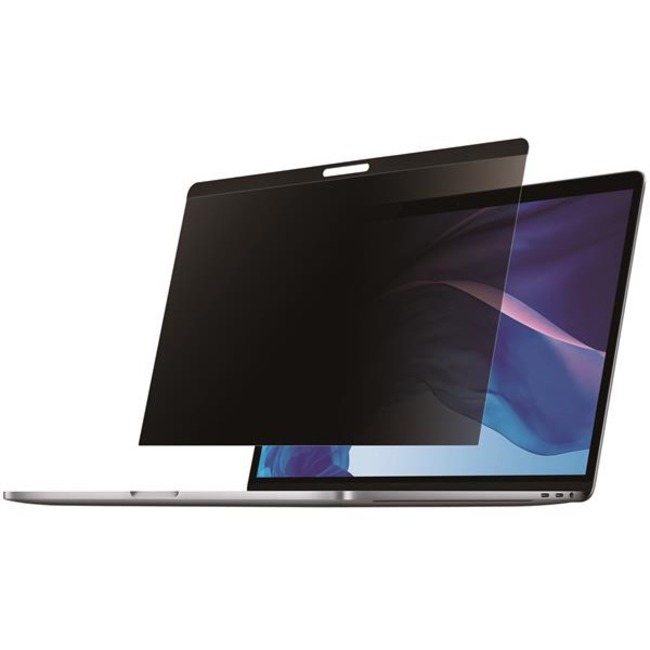
Image may not reflect the actual item.
Price: $84.99
+ Free Shipping
Quantity:

In Stock: 423
Last Updated: May 27, 2026
No Sales Tax except these states
 , PO and Wire.
Easy Magnetic InstallationThe laptop privacy screen is very easy to install and remove. Simply attach the MacBook privacy filter to your laptop using the built-in magnetic strip at the top of the privacy screen. This magnetic privacy screen is also reversible. The matte side provides you with glare reduction and the glossy side of the privacy screen will provide you with increased clarity. A protective folder is included to store the privacy screen in when the laptop is closed. Protect Your Privacy The laptop privacy filter is a great investment if you want to protect your privacy. It is a convenient and cost-effective way to keep your classified information, intellectual property or any other important data you wish to keep protected. Whether travelling, working in the office or sitting in a busy coffee shop, you can have a peace of mind because you know your screen is protected with the 30+/- degree privacy viewing angle. The privacy screen is also designed with a convenient cutout for the webcam of the MacBook Pro 13" (2016-2018) and MacBook Air 13" (2018).Blue Light Reduction The display privacy filter is designed to filter b blue light (390nm~480 wavelength) that can cause eye strain and can disrupt sleeping patterns. The Choice of IT Pros Since 1985 StarTech.com conducts thorough compatibility and performance testing on all our products to ensure we are meeting or exceeding industry standards and providing high-quality products to IT Professionals. Our local StarTech.com Technical Advisors have broad product expertise and work directly with our StarTech.com Engineers to provide support for our customers both pre and post-sales. The TAA compliant PRIVSCNMAC13 is backed by a StarTech.com 2-year warranty and free lifetime technical support. More from the Manufacturer

Main Specification
| General Information | |
| Manufacturer | StarTech.com |
| Manufacturer Part Number | PRIVSCNMAC13 |
| Manufacturer Website Address | http://www.startech.com |
| Brand Name | StarTech.com |
| Product Name | Privacy Screen Filter |
| Packaged Quantity | 1 Each |
| Product Type | Privacy Screen Filter |
| Technical Information | |
| Display Type Supported | LCD |
| Display Size Supported | 13" |
| Device Supported | MacBook |
| Aspect Ratio | 16:10 |
| Widescreen | Yes |
| Anti-glare | Yes |
| Blue Light Reduction | Yes |
| Features | Easy to Remove |
| Features | Magnetic |
| Features | Easy to Apply |
| Features | Reversible Matte-to-Glossy |
| Physical Characteristics | |
| Color Family | Clear |
| Product Color | Transparent |
| Product Material | Plastic |
| Durability | Fingerprint Resistant |
| Durability | Scratch Resistant |
| Durability | Dust Resistant |
| Height | 0.40" |
| Width | 11.70" |
| Depth | 7.60" |
| Weight (Approximate) | 1.31 oz |
| Miscellaneous | |
| Package Contents |
|
| Compatibility |
|
| Country of Origin | Taiwan |
| TAA Compliant | Yes |
| Environmentally Friendly | Yes |
| Environmental Compliance | Registration, Evaluation, Authorization and Restriction of Chemicals (REACH) |
| Environmental Compliance | Restriction of Hazardous Substances (RoHS) |
| Warranty | |
| Limited Warranty | 2 Year |


 WARNING:: The plastic used in cable products can expose you to lead and lead components,
chemicals known to the State of California to cause cancer, birth defects, or other reproductive harm.
For more information go to www.P65Warnings.ca.gov
WARNING:: The plastic used in cable products can expose you to lead and lead components,
chemicals known to the State of California to cause cancer, birth defects, or other reproductive harm.
For more information go to www.P65Warnings.ca.gov