Image may not reflect the actual item.
Price: $49.99
Quantity:

In Stock: 859
Last Updated: Oct 04, 2026
No Sales Tax except these states
 , PO and Wire.
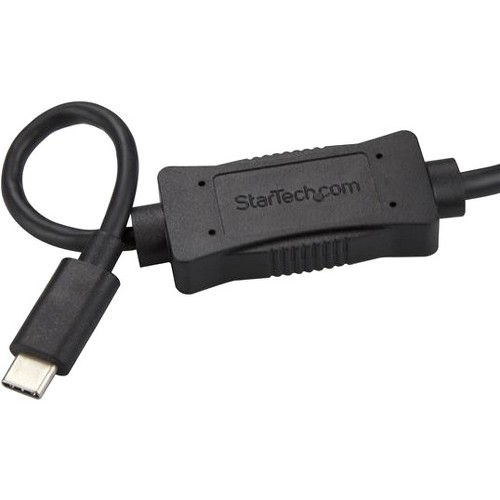
This USB-C™ to eSATA cable is an external drive adapter that gives you quick and easy access to an eSATA storage device through the USB-C or Thunderbolt™ 3 port on your laptop. Connect an Optical Disk Drive to Your Laptop Even if your laptop doesn't have eSATA ports, the USB 3.0 to eSATA cable makes it easy to connect it to an external storage device. The cable supports connections to standard SATA hard drives (HDD) and solid-state drives (SSD). The cable also supports connections to optical drives (ODD), enabling you to connect a CD-ROM or DVD-ROM drive to your laptop. Efficiently Perform Drive-Management Tasks The cable supports eSATA commands and functions such as SMART self-monitoring. It's also compatible with eSATA drive management hardware and software, such as backup utility software. When connected to a storage device housing HDD or SSD drives, the USB-C to eSATA cable lets IT professionals connect to drives for: Data recovery Repairing failing drives Re-using or re-purposing old drives Running drive diagnostics Disk imaging Backing up and archiving drives to prevent data loss Transferring content between the drive and the laptop The 1-meter cable lets you set up anywhere, enabling you to perform any one of these tasks in a lab, at someone's desk or out in the field. With plug-and-play installation, it's easy to connect on any operating system, without any extra software to install. USB3C2ESAT3 is backed by a StarTech.com 2-year warranty and free lifetime technical support. More from the Manufacturer

Main Specification
| General Information | |
| Manufacturer | StarTech.com |
| Manufacturer Part Number | USB3C2ESAT3 |
| Manufacturer Website Address | http://www.startech.com |
| Brand Name | StarTech.com |
| Product Name | eSATA/USB Data Transfer Cable |
| Packaged Quantity | 1 Each |
| Product Type | Data Transfer Adapter |
| Technical Information | |
| Connector Type on First End | eSATA - Male |
| Connector Gender on First End | Male |
| Connector on First End Details | 1 x 7-pin eSATA - Male |
| Connector Type on Second End | USB 3.0 Type C - Male |
| Connector Gender on Second End | Male |
| Connector on Second End Details | 1 x 24-pin USB 3.0 Type C - Male |
| Cable Length | 3.28 ft |
| Physical Characteristics | |
| Color Family | Black |
| Product Color | Black |
| Miscellaneous | |
| Package Contents |
|
| Country of Origin | China |
| Environmentally Friendly | Yes |
| Environmental Compliance | Restriction of Hazardous Substances (RoHS) |
| Environmental Compliance | Waste Electrical and Electronic Equipment Directive (WEEE) |
| Warranty | |
| Limited Warranty | 2 Year |


 WARNING:: The plastic used in cable products can expose you to lead and lead components,
chemicals known to the State of California to cause cancer, birth defects, or other reproductive harm.
For more information go to www.P65Warnings.ca.gov
WARNING:: The plastic used in cable products can expose you to lead and lead components,
chemicals known to the State of California to cause cancer, birth defects, or other reproductive harm.
For more information go to www.P65Warnings.ca.gov