
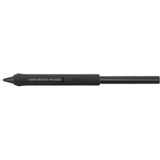
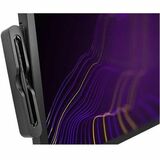
Keep Your Pen Ready for Use
Keep your pen ready to use and safe while storing your extra nibs and grips. Easily attaches to your Wacom Cintiq Pro 27.


1PK WACOM DRAWING GLOVE
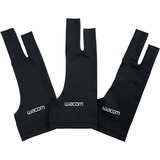
3PK WACOM DRAWING GLOVE
Eliminate fingerprints and smudgesBoost your productivity and avoid interruptions
While working on your graphic display your art should always be the focus. Enjoy an undistracted workflow for hours without annoying breaks for cleaning your display and removing smudges and fingerprints. With everything clearly visible on your screen, nothing comes between you and your creation. For better results and more effectivity.
Designed for real hands-on mentalityThe right choice for every digital artist
Wacom Drawing Glove's unique fingerless design and seamless edge allows for a natural working experience. Focus on your drawing and access touch functionality on screen as well as the keyboard. Designed to work perfectly whether you're left or right-handed. Sounds good? You'll find it feels good too.
Good for your art, no harm for the environmentMade out of 90% recycled materials
Designed with eco-friendly recycled materials, the Wacom Drawing Glove allows you to draw with the freedom of knowing you are helping the world we live in. Recycled Polyester and Spandex offer breathability, stretch and durability for a comfortable fit. Feel comfortable drawing anything and know that you're contributing to a better environment.

WACOM ONE MEDIUM NO SCREEN CREATIVE TABLET
Learning made easy
From learning to draw and edit photos to collaborating in online classes or completing academic assignments with natural handwriting, One by Wacom brings an easy to use digital pen to PC, Mac and most Chromebooks. Digital learning and creativity couldn't be easier.
The natural pen experience
One by Wacom's pressure sensitive and battery free pen is the perfect tool for learning. It brings a familiar, pen-on-paper feel to drawing and writing and is simple to set up and use.
A versatile choice for students and beginning artists
Available in two sizes, One by Wacom can be used with most pen-enabled creative software as well as many online learning applications and platforms on PC, Mac and most Chromebooks. Whatever and wherever you are learning, One by Wacom can help.
Take your creativity to a new level
Sketch and paint with more precision. Our advanced electro-magnetic pen technology gives you excellent control and accuracy. One by Wacom helps your art projects come out the way you've always wanted, by perfectly matching the movement of your pen. Editing photos? Everything from complicated cut-outs to delicate color adjustments are so much easier. Get ready for a load more 'Likes'.
One by Wacom now also works with Chromebook. Bringing the pen tablet into the digital classroom
Wacom takes digital learning to the next level. The realistic digital pen recreates the classroom experience from anywhere. It gives you the freedom to write, annotate, create, collaborate, study or teach in ways like never before.
Great bundled apps for education
Gain 3 months complimentary access to great bundled apps specially tailored for education. The apps enable teachers and students to collaborate and share ideas just as easily as in the classroom.
So simple to set up
Whatever you want to create or learn, it's easy with One by Wacom. The tablet has everything you need, and nothing that you don't, so it is easy to get started on your next creative project, homework or course preparation. Just connect the USB cable to your Mac, PC, or Chromebook*, download and install the driver** and you're ready to go.
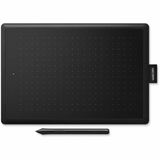
WACOM ONE SMALL NO SCREEN CREATIVE TABLET
Learning made easy
From learning to draw and edit photos to collaborating in online classes or completing academic assignments with natural handwriting, One by Wacom brings an easy to use digital pen to PC, Mac and most Chromebooks. Digital learning and creativity couldn't be easier.
The natural pen experience
One by Wacom's pressure sensitive and battery free pen is the perfect tool for learning. It brings a familiar, pen-on-paper feel to drawing and writing and is simple to set up and use.
A versatile choice for students and beginning artists
Available in two sizes, One by Wacom can be used with most pen-enabled creative software as well as many online learning applications and platforms on PC, Mac and most Chromebooks. Whatever and wherever you are learning, One by Wacom can help.
Take your creativity to a new level
Sketch and paint with more precision. Our advanced electro-magnetic pen technology gives you excellent control and accuracy. One by Wacom helps your art projects come out the way you've always wanted, by perfectly matching the movement of your pen. Editing photos? Everything from complicated cut-outs to delicate color adjustments are so much easier. Get ready for a load more 'Likes'.
One by Wacom now also works with Chromebook. Bringing the pen tablet into the digital classroom
Wacom takes digital learning to the next level. The realistic digital pen recreates the classroom experience from anywhere. It gives you the freedom to write, annotate, create, collaborate, study or teach in ways like never before.
Great bundled apps for education
Gain 3 months complimentary access to great bundled apps specially tailored for education. The apps enable teachers and students to collaborate and share ideas just as easily as in the classroom.
So simple to set up
Whatever you want to create or learn, it's easy with One by Wacom. The tablet has everything you need, and nothing that you don't, so it is easy to get started on your next creative project, homework or course preparation. Just connect the USB cable to your Mac, PC, or Chromebook*, download and install the driver** and you're ready to go.
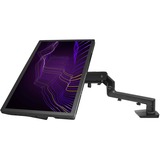
WACOM FLEX ARM ADAPTER FOR WACOM CINTIQ PRO 24/32
Transform your Wacom Flex Arm to a suitable stand for the Wacom Cintiq Pro 27. Attach the Retro Fit Kit to you existing Flex Arm and gain new possibilities thanks to VESA compatibility.
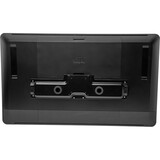
CINTIQ PRO VESA MOUNT
Create your ideal work space: the Wacom VESA mount provides stable support for your Cintiq Pro 24 and 32 when attached to 3rd party arms or brackets. With the VESA mount adapter attached, your Cintiq complies with the VESA FDMI (MIS-D 75/100) standard version. And whether or not you're using Wacom Cintiq Pro Engine, it's designed to make cable management easier.
- Stable support for your Wacom Cintiq Pro 24 or 32
- Fits VESA FDMI (MIS-D 75/100)
- Good cable management (with or without Wacom Cintiq Pro Engine)
What's Included
- Wacom VESA mounting bracket
- Quick Start Guide
A compatible arm must:
- Support the VESA 75 x 75 mm or 100 x 100 mm hole mount pattern
- AND be able to hold the weight of your Cintiq Pro:
- Cintiq Pro 24: 8.7 kg/19.2 lbs, with Cintiq Pro Engine: 10.7 kg/23.6 lbs
- Cintiq Pro 32: 14.7 kg/32.4 lbs, with Cintiq Pro Engine: 16.7 kg/36.8 lbs

CINTIQ PRO 27 USB-C TO C 1.8M CINTIQ PRO USB-C TO C CABLE
Replacement USB-C to C cable for your Wacom Cintiq Pro 27 (1.8 meters long).
